
……More Computer Speed Tips
One of the best computer speed tips is to cut down on all the processes that burden your CPU. Windows has a lovely interface. Fading icons, drop down shadows, animate windows are just a few of the fancy features. However, these features are completely unnecessary to your computer performance. All these features bog down your CPU. So, if you would like to increase your Windows speed eliminate some of these options. Here is how:
- Click Start, and then click Control Panel.
- Click System.
- Find the Advanced tab and Click
- Under Performance, Click Settings
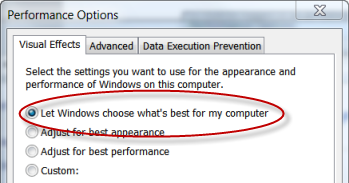
- Under Visuals Effects, you may choose from a list of options such as Adjust for best performance or custom. If you choose Adjust for best performance all the features will be unchecked.
I recommend choosing the Adjust for best performance option. However if you feel Windows is missing some flare, choose Custom. Then you can individually add whatever features you like to jazz up your Windows appearance.
RETURN TO COMPUTER SPEED TIPS PAGE
5 Minute Tweaks Ways to Make a Faster Computer