To Stop Startup programs from loading on your PC only takes a few steps. It’s important to remove programs from startup in order to save your vital resources. Startup programs are loaded into your RAM space when Windows is loading. Thus, using vital resources that could be used for other more important applications.
For Ways to Stop Windows Services, Click Here.
In XP, Vista and Windows 7
- Open your Start menu.
- Click Run
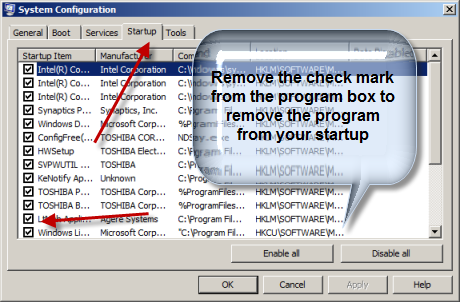
- In the command screen type msconfig.exe
- In the system configuration utility,click either service or startup tab.
- Uncheck all programs that your are no longer want to run in the background.
- Click OK
In Vista
- Click Start button and load the Control Panel
- Under the Control Panel menu, click Programs.
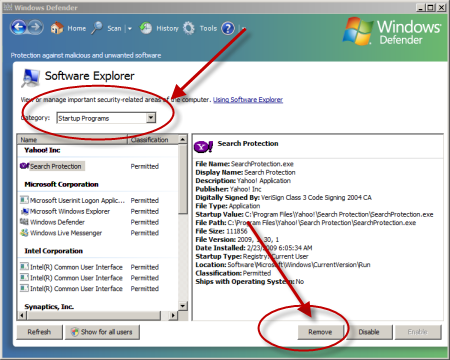
- Under the Windows Defender heading choose View currently running programs
- Choose Startup Programs from the Category option
- Remove Programs that you feel unnecessary for startup
OR
In Windows 7
- Click Start
- Click All Programs
- Click Startup
- Delete the Program
Learn how to Boot Up in 30 seconds, Click Here to Learn how make your PC Start Up Fast!
REMOVE REGISTRY KEYS
The above describes the traditional method to stop startup programs. You may need to take it a few steps further to remove startup programs. Some programs burrow deeper in your setup than normally. For these you may have to edit your registry. This is a dangerous task because mistakes can sometimes yield your computer inoperable. Stop Startup Programs safely and Speed Up Your PC with a Registry Cleaner. Click Here to Learn More!
How to Remove Startup Programs from the Registry
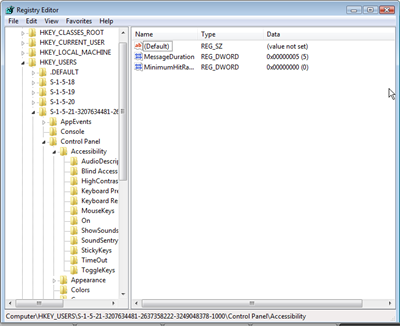
Open the registry by simply typing “regedit” into the RUN command line. Follow the instructions below:
- Click Start
- Click Run
- Type Regedit into the command line and press enter. The registry should load for your review.
HKLM\SOFTWARE\Microsoft\Shared Tools\MSConfig\startupfolder
You will find the programs location in key under this heading.
Also try this area for programs opening from the registry:
HKLM\SOFTWARE\Microsoft\Shared Tools\MSConfig\startupreg