
Learning how to defrag a computer will save your computer’s life. This task should be a part of your routine computer maintenance schedule. Why?- Because performing this action can extend the life of your PC for years. Also it can exponentially increase your PC performance. Follow these easy how to steps to defrag a computer with a few simple clicks.
One of the more important reasons to defrag a computer is to extend the life of your hard drive. Just remember the more jumbled and fragmented your hard drive is the the longer it will take to find and access specific files. So, it only make sense that you keep your computer filing system in order.
How to defragment your computer hard drive in Windows
In XP/Vista
- Open the Start Menu
- Click on My Computer
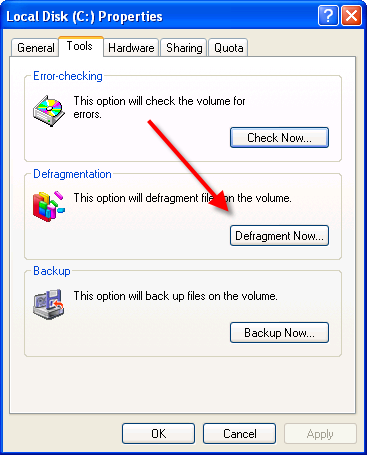
- Right Click your C: drive or your hard drive image.
- Scroll down to the “Properties” Click
- In the Properties Menus, Open the “Tools” menu.
- Choose Defragment Now.
- In the Disk Deframenter menu. Click on “Defragment”
In Windows 7
- Click Start.
- Choose All Programs.
- Click Accessories then System Tools.
- Click Defragmenter
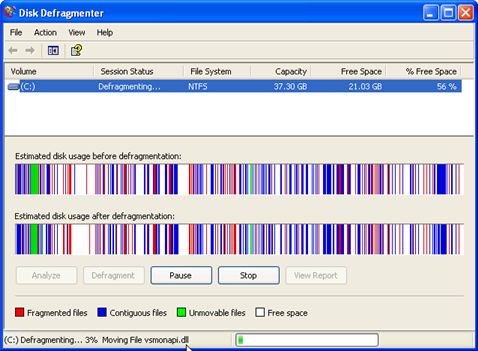
The image displays a computer that is suffering from a large amount of fragmented data. This is demonstrated by the collection of broken bars. Each color indicates different data fields, files, and blocks of data. In “healthy” computer, one with very little fragmentation, the disk defragmenter would display a collection of large continuous blocks consisting of one color. After you defrag a computer you should see these results
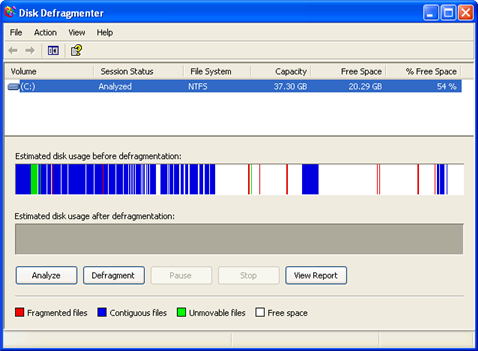
Performing an “Analysis” after to see to the overall improvement in organizing your data. Your PC speed should significantly improve. Learning how to defrag a computer is just one of the steps in speed up your PC.
Click Here to learn how to Speed Up Your Hard Drive.
Enable Write Caching
If you have Windows Vista or Window 7 & 8 you can use an advanced feature such as Write Caching. This helps to speed up your hard drive performance and free up CPU resources. Check out the video to learn more.
New SSD Hard Drives
There’s is a lot of debate about whether you should defrag a SSD hard drive. SSD stands for standard state drives that means there are no moving parts. HDD which stands for hard disk drives have moving disk and parts. SSD are similar technology to your flash drives. The reason for this is that every time SSD hard drives are written on they are damaged as opposed to regular HDD which allow for constant writing and rewriting. So theoretically, the act of deffragging will actually damage your SSD permanently. So with the current set of SSD, you should not defrag your SSDs. Sadly all hard drives get slower over time. However, SSD seem to degrade a bit faster.
RELATED TUTORIALS:
Speed Up Windows 7
Speed Up Slow Internet Connection
Stop Buffering Problems