
What is a rundll error?
Rundll.exe files are systems process directly related to your computer’s Windows Registry. All Dll files are a part of vast library that contains code and data that is shared by many programs. This helps to produce speed and memory efficiency in your operating system by reusing the same code or file to run many functions by various programs. An error occurs when program aren’t allowed to access this code.
Why do you have Rundll Errors?
Windows uses rundll files to load programs, files and applications. If the dll file is missing or corrupted, any application using that file cannot be loaded. This will produce a rundll error. The reason why the file has gone missing is often linked to spyware or a virus. This kind of malware often tries to hijack the files being shared by the rundll file. The other programs sharing the file then do not operate efficiently or wont load at all.
How to Find and Delete Rundll Errors
STEP 1: IDENTIFY
The first thing you must do is to identify the specific rundll process. This is not a difficult task; there is a vast online process library in which you can evaluate the validity of the process that is running. When the error dialog box opens, it displays the the process name. For example, if the dialog pops up and shows you the dll error:
Error loading C:WINDOWS\ system32\ usvdgpo.dll
Visit www.processlibrary.com or simply google the dll by copying and Pasting the dll or simply type it into the search box. The results will indicate that the program is a part of trojan spyware. You can use Microsoft Process Explorer also to identify the process.
If you already know the program that the dll is attached to, you can simply go into the program folder to find the dll in question.
- Click Start
- Click All Programs
- Find the Program, Right Click
- Choose Open File Location
- Locate the dll
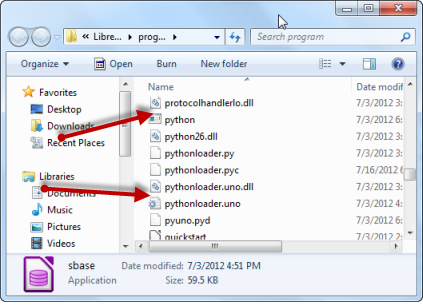
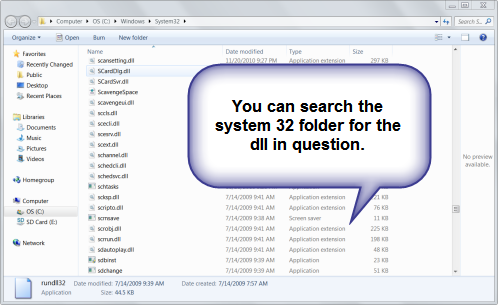
It’s possible to locate the dll in the System32. You will have to open the task manager to do this. Here is how to locate the dll in the System32 folder.
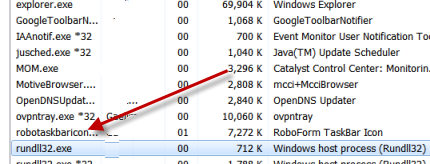
- Click CTRL-ALT-DELETE to Open the task manager
- Click the Process tab, scroll down to Rundll32.exe
- Right Click Open File Location.
- Search for the dll
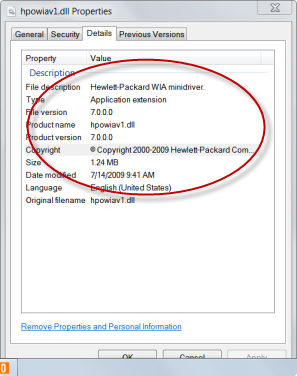
- When you find it, Click Properties
- Click Details to see what program runs the dll.
If the dll windows pops up saying your that its missing, Check out this these Fix Missing Rundll Message tutorial. When you find the dll. If should have a normal Windows icon. If there’s no icon, this means the dll is corrupted by malware.
STEP 2: STOP THE PROCESS (Optional)
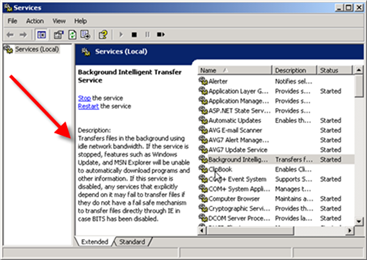
Often you can locate the dll services in the services configuration. Find the identified service and disable it. If you only know the program attached to the dll, follow the steps for removing the program from start up. You can open up your services configuration by following instructions below:
- Open your Start menu.
- Click Run
- In the command screen type: services.msc
- This will bring up the Services Management window. If you drag the mouse to one of the services. It will give you a detailed explanation of the service in question. By right clicking the individual service, you can view properties or stop it.
- Stop the “dll”service immediately.
NOTE: Sometimes the dll process can not be stopped by the above method. In this case, remove the program from the startup configuration.
- Click Start > Programs> Accessories
- Click Run
- Type Msconfig
- Click the Service or Start up, locate the service, program or app
- Remove it from your computer start up by deselecting it.
STEP 3: LOCATE, DELETE OR REPLACE
Now you know the application connected to the rundll. You can uninstall the program, download a new dll or delete it from the registry. This is the most certain way is to delete the error. You can use the Program CD to replace the dll after you delete it or simply re-download the dll or copy and past it.
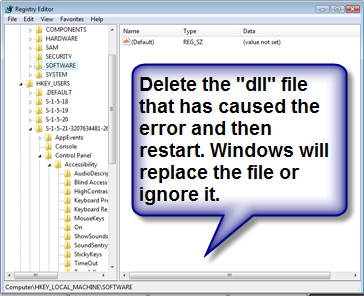
To remove it from the registry, you will have to open your Windows Registry File System. This is an extremely delicate process. You may want to use a repair program to find the file. These may be specific to the particular program. This will often fix the rundll error in question, eliminate other errors and also speed up your computer. The registry key: HKEY_LOCAL_MACHINE> SOFTWARE> Microsoft> Windows> CurrentVersion> RUN
This action will help you speed up your applications load times considerable. Here is how:
- Click Start
- Click Run
- Type regedit
- Find this registry key:
HKEY_LOCAL_MACHINE> SOFTWARE> Microsoft> Windows> CurrentVersion> RUN - In the right section click:”rusvdgpo” = “%System% rundll32.exe %System% usvdgpo.dll, [RANDOM LETTERS]”
- Delete the value and Restart.
What is RUNDLL32?
The difference between these rundll and rundll32 is 16bit and 32bit. The most important thing to remember is the Windows operating system uses 32bit dll. So when you see RUNDLL32, its an indication that it maybe a system file.
REPLACE DLL WITH WINDOWS CD
System32 files belong to Windows System files. So, you will need your Windows CD or the Windows Service Pack to replace these files. Using the Windows CD can easily fix the rundll error. If you have the Windows CD, you wont need the name of the specific System32 dll. All the corrupted or missing files will be replaced with ease. Before you perform this process, you should run your antispyware program.
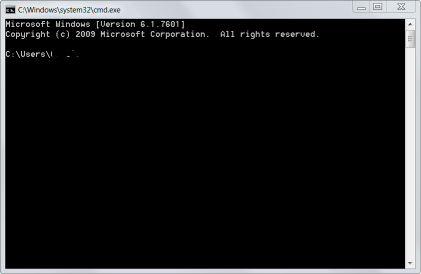
- After inserting the Windows CD, Click the CMD Prompt
You reach the comand prompt by typing CMD into the search bar. - Type in your CD Drive:( D: is my CD drive)
expand D:\i386\rundll32.ex_ C:\windows\system32\rundll32.exe - This will copy the files that were corrupted or missing with the original files. Hopefully these tips help you fix your RUNDLL error.
SPECIAL NOTES
rundll.exe is an essential system process. However, it has a large back door vulnerability which makes it prone to malicious purposes by an attacker allowing access to your computer from remote locations, stealing passwords, Internet banking and personal data.
Trojans are usually use this method of attack to share a process that invites other malware either more trojans or other forms of spyware. The best defense is to keep your security software up to date and account for the rundll processes on your computer.
RELATED TUTORIALS:
Popular Articles
Best Registry Cleaner
Fix a Slow Internet Connection
Speed Up Internet Videos